Captions that land on the word.
The line sits small and white, and the one word that carries it goes big, coloured and glowing. Pick a style, pick the clips, and the panel writes the captions onto your timeline in time with the speech.
Word Captions is part of Pro: $19 a month, or $149 for the first year. The panel itself is free to download. Tested on Premiere Pro 2026; 2025 and 2024 work too, on Windows and Mac.
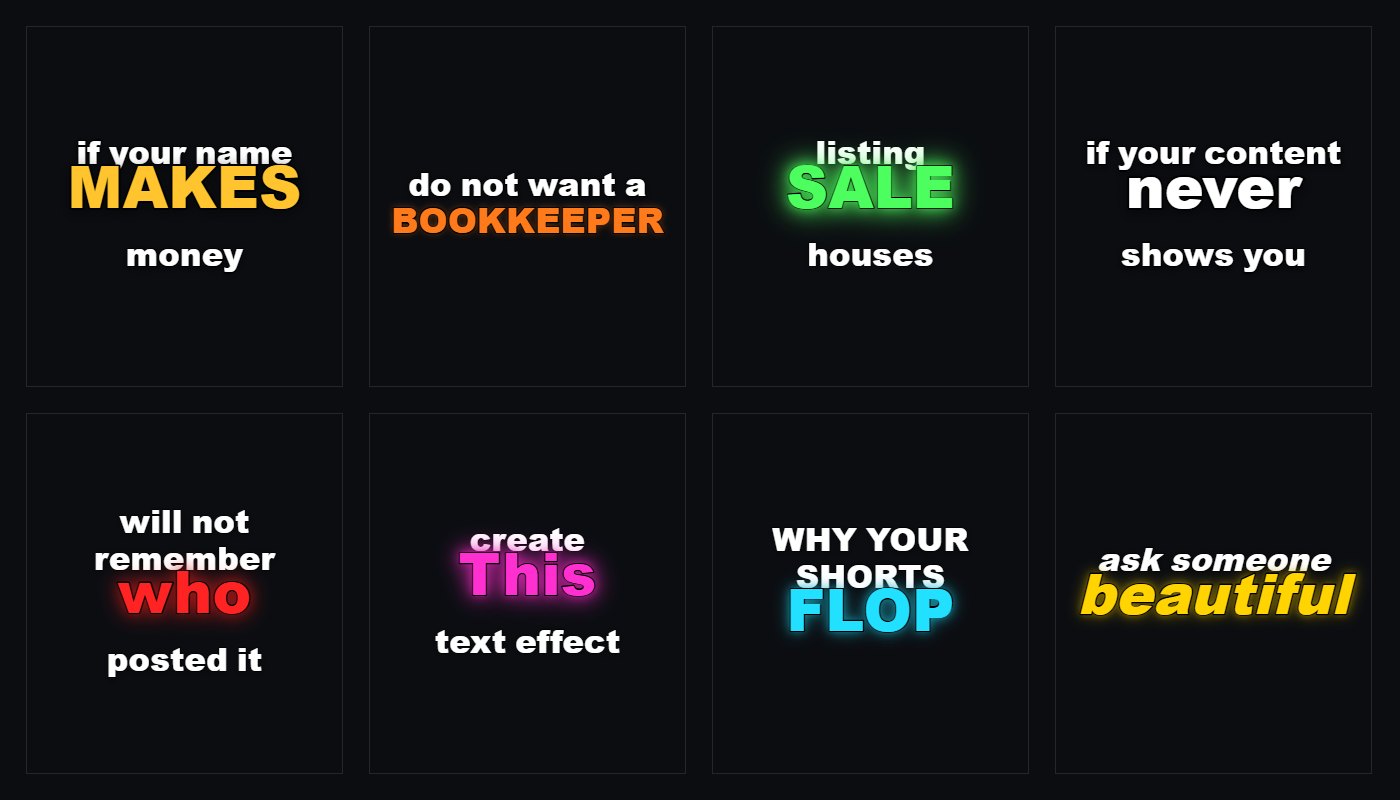
Eight styles, and everything about them is yours.
One word does the work
The panel finds the word that carries each line — money and numbers first, then the longest word that is not a joining word — and gives it its own line, at nearly twice the size, in the colour of the style.
Eight ready to go
Gold, Orange, Neon green, White, Red, Magenta, Cyan and a slanted Yellow. A style is only a bundle of the ordinary settings, so after you pick one you can still change the colour, the size, the glow or the animation.
Glow you can shape
Size and strength are separate sliders. The halo is drawn underneath the letter in several passes, so it reads as light coming off the word and the edge stays sharp however far you push it.
Only the clips you pick
Caption the whole sequence, the part between your In and Out points, or just the clips you selected. Selected clips are handled one at a time, so nothing appears over the gaps between them.
Any shape of frame
Vertical, square or wide. A line wider than the frame is scaled down until it fits, which is why a short word comes out huge and a long one a little smaller — the look those captions are known for.
Transcribed on your PC
90+ languages, auto-detected, running offline on your own machine. Nothing is uploaded and there are no credits. Already have an SRT, VTT or JSON transcript? Import it instead.
The captions follow the words, not the sentence.
Most tools take the times of a whole spoken segment, which run on until the next one starts. Word Captions takes each word's own timing out of the engine, so a word is on screen for as long as it is said and a pause is a real pause.
Transcribe or import. Run it on your own machine, or bring an SRT, VTT or JSON file you already have.
Pick a style and how many words a caption holds. The preview is the shape of your sequence, so what you see is what lands.
Add to timeline. The captions arrive on a track of their own, on the exact frame, at your sequence's frame rate.
Frequently asked
Does my footage or audio leave my computer?
No. The transcription engine runs on your own machine and the captions are drawn there too. Nothing is uploaded, and it works with no internet connection once the engine and the language model have been downloaded the first time.
Which languages does it handle?
Over 90, detected automatically or set by hand. Four model sizes, from a fast 75 MB one to a slower 1.5 GB one that is more accurate.
Does the person I send the project to need the panel?
No. The styled captions are ordinary image clips on a video track, and the plain mode makes a real Premiere caption track. Both open anywhere.
Can I edit the words afterwards?
In the plain Premiere caption mode, yes — it is a normal caption track you style in Essential Graphics. The styled captions are rendered pictures, so a change to the words means correcting the transcript in the panel and adding them again.
Why are the styled captions pictures instead of text?
Because Premiere's own caption track cannot colour or resize one word inside a line, let alone animate it. Drawing them is the only way to get this look, and it is why the panel offers both.
Can I change which word goes big?
The panel picks it, and you can turn the whole idea off with one switch if you would rather have every word the same size. Size, capitals and glow for the big word each have their own control.
Is it free?
Word Captions is part of Pro, along with the rest of Auto Edit. The panel is free to download and a lot of it stays free — see the plans.